Custom Account System
Currently, Zadig user system uses the open-source project Dex(opens new window) as an identity connector. However, Dex supports a limited list of protocols (Dex supported protocols(opens new window)), and Zadig has implemented some standard extensions based on the Dex official library, such as OAuth protocol. If your account system is not officially supported by Zadig, you can integrate your custom account system by forking koderover/dex(opens new window) and writing a Connector.
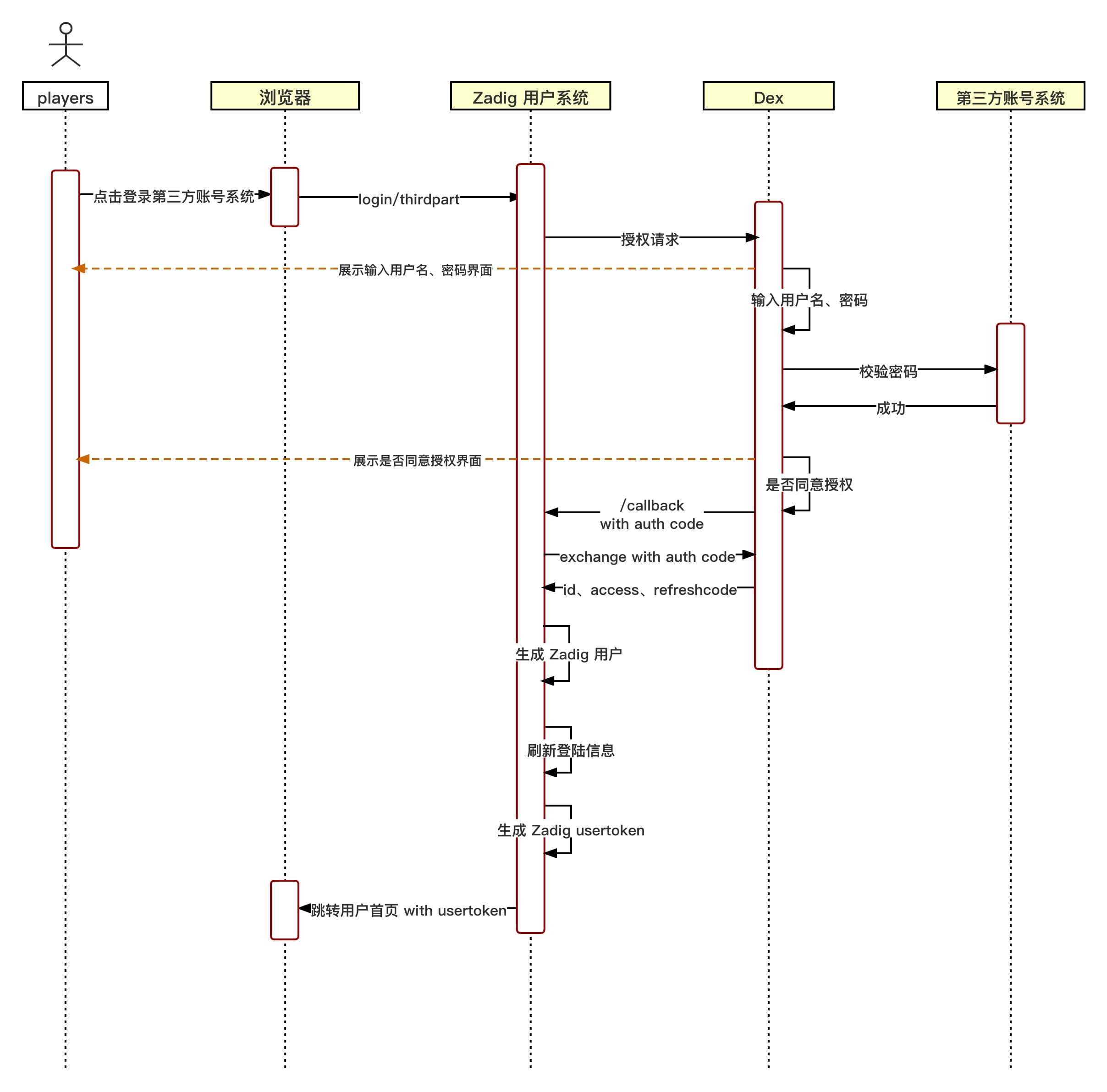
# Custom Account System Login Flow Chart
# Custom Account System Integration Process
# Step 1: Write a Custom Dex Connector
- fork koderover/dex(opens new window)
- Write Dex custom Connector (based on the latest Branch release-1.10.0)
- Currently Dex Connector interface is defined in dex/connector/connector.go(opens new window) , and the official abstracts four interfaces:
PasswordConnector,CallbackConnector,RefreshConnector, andSAMLConnectorUsers can implement their own Connector according to their own account system, and use dex/connector various Connector combinations to implement these four interfaces.
The following is a brief description of each interface, and the corresponding interface needs to be implemented according to the specific interaction method of the account system login:
| Interface name | Instructions for use | Currently available for reference |
|---|---|---|
| PasswordConnector | 1. Simple use of username and password to log in to obtain user information. Dex The interaction with the account system is synchronous | keystone , atlassiancrowed , ldap , mock/passwordConnector , passwordDB (located at dex/server/server.go(opens new window) |
| CallbackConnector | 1. Redirecting to obtain user information Dex The interaction with the account system is asynchronous | mock/Callback, bitbucketcloud, authproxy, gitea, github, gitlab, google, linkedin, microsoft, oauth, oidc, openshift |
| SAMLConnector | A SAML connector that implements HTTP POST binding. RelayState is handled by the server | saml |
| RefreshConnector | After implementation, you can update the client claims | mock/Callback, bitbucketcloud, atlassiancrowed, gitea, github, gitlab, google, ldap, linkedin, microsoft, mock/passwordConnector, oidc, passwordDB (located in dex/server/server.go) |
- Add the added custom connector type and name to the ConnectorsConfig in dex/server/server.go.
# Reference Example
Take the OAuth connector in the dex/connector directory as an example to explain.
- Implement connector interface
This connector implements the CallbackConnector interface.
The following is the code OAuth connector
Details
package oauth

import (
   "context"
   "crypto/tls"
   "crypto/x509"
   "encoding/base64"
   "encoding/json"
   "errors"
   "fmt"
   "io/ioutil"
   "net"
   "net/http"
   "strings"
   "time"

   "golang.org/x/oauth2"

   "github.com/dexidp/dex/connector"
   "github.com/dexidp/dex/pkg/log"
)

type oauthConnector struct {
   clientID             string
   clientSecret         string
   redirectURI          string
   tokenURL             string
   authorizationURL     string
   userInfoURL          string
   scopes               []string
   userIDKey            string
   userNameKey          string
   preferredUsernameKey string
   emailKey             string
   emailVerifiedKey     string
   groupsKey            string
   httpClient           *http.Client
   logger               log.Logger
}

type connectorData struct {
   AccessToken string
}

type Config struct {
   ClientID           string   `json:"clientID"`
   ClientSecret       string   `json:"clientSecret"`
   RedirectURI        string   `json:"redirectURI"`
   TokenURL           string   `json:"tokenURL"`
   AuthorizationURL   string   `json:"authorizationURL"`
   UserInfoURL        string   `json:"userInfoURL"`
   Scopes             []string `json:"scopes"`
   RootCAs            []string `json:"rootCAs"`
   InsecureSkipVerify bool     `json:"insecureSkipVerify"`
   UserIDKey          string   `json:"userIDKey"` // defaults to "id"
   ClaimMapping       struct {
      UserNameKey          string `json:"userNameKey"`          // defaults to "user_name"
      PreferredUsernameKey string `json:"preferredUsernameKey"` // defaults to "preferred_username"
      GroupsKey            string `json:"groupsKey"`            // defaults to "groups"
      EmailKey             string `json:"emailKey"`             // defaults to "email"
      EmailVerifiedKey     string `json:"emailVerifiedKey"`     // defaults to "email_verified"
   } `json:"claimMapping"`
}

func (c *Config) Open(id string, logger log.Logger) (connector.Connector, error) {
   var err error

   if c.UserIDKey == "" {
      c.UserIDKey = "id"
   }

   if c.ClaimMapping.UserNameKey == "" {
      c.ClaimMapping.UserNameKey = "user_name"
   }

   if c.ClaimMapping.PreferredUsernameKey == "" {
      c.ClaimMapping.PreferredUsernameKey = "preferred_username"
   }

   if c.ClaimMapping.GroupsKey == "" {
      c.ClaimMapping.GroupsKey = "groups"
   }

   if c.ClaimMapping.EmailKey == "" {
      c.ClaimMapping.EmailKey = "email"
   }

   if c.ClaimMapping.EmailVerifiedKey == "" {
      c.ClaimMapping.EmailVerifiedKey = "email_verified"
   }
   oauthConn := &oauthConnector{
      clientID:             c.ClientID,
      clientSecret:         c.ClientSecret,
      tokenURL:             c.TokenURL,
      authorizationURL:     c.AuthorizationURL,
      userInfoURL:          c.UserInfoURL,
      scopes:               c.Scopes,
      redirectURI:          c.RedirectURI,
      logger:               logger,
      userIDKey:            c.UserIDKey,
      userNameKey:          c.ClaimMapping.UserNameKey,
      preferredUsernameKey: c.ClaimMapping.PreferredUsernameKey,
      groupsKey:            c.ClaimMapping.GroupsKey,
      emailKey:             c.ClaimMapping.EmailKey,
      emailVerifiedKey:     c.ClaimMapping.EmailVerifiedKey,
   }

   oauthConn.httpClient, err = newHTTPClient(c.RootCAs, c.InsecureSkipVerify)
   if err != nil {
      return nil, err
   }

   return oauthConn, err
}

func newHTTPClient(rootCAs []string, insecureSkipVerify bool) (*http.Client, error) {
   pool, err := x509.SystemCertPool()
   if err != nil {
      return nil, err
   }

   tlsConfig := tls.Config{RootCAs: pool, InsecureSkipVerify: insecureSkipVerify}
   for _, rootCA := range rootCAs {
      rootCABytes, err := ioutil.ReadFile(rootCA)
      if err != nil {
         return nil, fmt.Errorf("failed to read root-ca: %v", err)
      }
      if !tlsConfig.RootCAs.AppendCertsFromPEM(rootCABytes) {
         return nil, fmt.Errorf("no certs found in root CA file %q", rootCA)
      }
   }

   return &http.Client{
      Transport: &http.Transport{
         TLSClientConfig: &tlsConfig,
         Proxy:           http.ProxyFromEnvironment,
         DialContext: (&net.Dialer{
            Timeout:   30 * time.Second,
            KeepAlive: 30 * time.Second,
            DualStack: true,
         }).DialContext,
         MaxIdleConns:          100,
         IdleConnTimeout:       90 * time.Second,
         TLSHandshakeTimeout:   10 * time.Second,
         ExpectContinueTimeout: 1 * time.Second,
      },
   }, nil
}

func (c *oauthConnector) LoginURL(scopes connector.Scopes, callbackURL, state string) (string, error) {
   if c.redirectURI != callbackURL {
      c.logger.Errorf("expected callback URL %q did not match the URL in the config %q", callbackURL, c.redirectURI)
      return "", fmt.Errorf("expected callback URL %q did not match the URL in the config %q", callbackURL, c.redirectURI)
   }

   oauth2Config := &oauth2.Config{
      ClientID:     c.clientID,
      ClientSecret: c.clientSecret,
      Endpoint:     oauth2.Endpoint{TokenURL: c.tokenURL, AuthURL: c.authorizationURL},
      RedirectURL:  c.redirectURI,
      Scopes:       c.scopes,
   }

   return oauth2Config.AuthCodeURL(state), nil
}

func (c *oauthConnector) HandleCallback(s connector.Scopes, r *http.Request) (identity connector.Identity, err error) {
   q := r.URL.Query()
   if errType := q.Get("error"); errType != "" {
      c.logger.Errorf("get error:%s", q.Get("error_description"))
      return identity, errors.New(q.Get("error_description"))
   }

   oauth2Config := &oauth2.Config{
      ClientID:     c.clientID,
      ClientSecret: c.clientSecret,
      Endpoint:     oauth2.Endpoint{TokenURL: c.tokenURL, AuthURL: c.authorizationURL},
      RedirectURL:  c.redirectURI,
      Scopes:       c.scopes,
   }

   ctx := context.WithValue(r.Context(), oauth2.HTTPClient, c.httpClient)

   token, err := oauth2Config.Exchange(ctx, q.Get("code"))
   if err != nil {
      c.logger.Errorf("OAuth connector: failed to get token: %v", err)
      return identity, fmt.Errorf("OAuth connector: failed to get token: %v", err)
   }

   client := oauth2.NewClient(ctx, oauth2.StaticTokenSource(token))

   userInfoResp, err := client.Get(c.userInfoURL)
   if err != nil {
      c.logger.Errorf("OAuth Connector: failed to execute request to userinfo: %v", err)
      return identity, fmt.Errorf("OAuth Connector: failed to execute request to userinfo: %v", err)
   }
   defer userInfoResp.Body.Close()

   if userInfoResp.StatusCode != http.StatusOK {
      c.logger.Errorf("OAuth Connector: failed to execute request to userinfo: status %d", userInfoResp.StatusCode)
      return identity, fmt.Errorf("OAuth Connector: failed to execute request to userinfo: status %d", userInfoResp.StatusCode)
   }

   var userInfoResult map[string]interface{}
   err = json.NewDecoder(userInfoResp.Body).Decode(&userInfoResult)
   if err != nil {
      c.logger.Errorf("OAuth Connector: failed to parse userinfo: %v", err)
      return identity, fmt.Errorf("OAuth Connector: failed to parse userinfo: %v", err)
   }

   userID, found := userInfoResult[c.userIDKey].(string)
   if !found {
      c.logger.Errorf("OAuth Connector: not found %v claim", c.userIDKey)
      return identity, fmt.Errorf("OAuth Connector: not found %v claim", c.userIDKey)
   }

   identity.UserID = userID
   identity.Username, _ = userInfoResult[c.userNameKey].(string)
   identity.PreferredUsername, _ = userInfoResult[c.preferredUsernameKey].(string)
   identity.Email, _ = userInfoResult[c.emailKey].(string)
   identity.EmailVerified, _ = userInfoResult[c.emailVerifiedKey].(bool)

   if s.Groups {
      groups := map[string]struct{}{}

      c.addGroupsFromMap(groups, userInfoResult)
      c.addGroupsFromToken(groups, token.AccessToken)

      for groupName := range groups {
         identity.Groups = append(identity.Groups, groupName)
      }
   }

   if s.OfflineAccess {
      data := connectorData{AccessToken: token.AccessToken}
      connData, err := json.Marshal(data)
      if err != nil {
         c.logger.Errorf("OAuth Connector: failed to parse connector data for offline access: %v", err)
         return identity, fmt.Errorf("OAuth Connector: failed to parse connector data for offline access: %v", err)
      }
      identity.ConnectorData = connData
   }
   return identity, nil
}

func (c *oauthConnector) addGroupsFromMap(groups map[string]struct{}, result map[string]interface{}) error {
   groupsClaim, ok := result[c.groupsKey].([]interface{})
   if !ok {
      return errors.New("cannot convert to slice")
   }

   for _, group := range groupsClaim {
      if groupString, ok := group.(string); ok {
         groups[groupString] = struct{}{}
      }
   }

   return nil
}

func (c *oauthConnector) addGroupsFromToken(groups map[string]struct{}, token string) error {
   parts := strings.Split(token, ".")
   if len(parts) < 2 {
      return errors.New("invalid token")
   }

   decoded, err := decode(parts[1])
   if err != nil {
      return err
   }

   var claimsMap map[string]interface{}
   err = json.Unmarshal(decoded, &claimsMap)
   if err != nil {
      return err
   }

   return c.addGroupsFromMap(groups, claimsMap)
}

func decode(seg string) ([]byte, error) {
   if l := len(seg) % 4; l > 0 {
      seg += strings.Repeat("=", 4-l)
   }

   return base64.URLEncoding.DecodeString(seg)
}
2
3
4
5
6
7
8
9
10
11
12
13
14
15
16
17
18
19
20
21
22
23
24
25
26
27
28
29
30
31
32
33
34
35
36
37
38
39
40
41
42
43
44
45
46
47
48
49
50
51
52
53
54
55
56
57
58
59
60
61
62
63
64
65
66
67
68
69
70
71
72
73
74
75
76
77
78
79
80
81
82
83
84
85
86
87
88
89
90
91
92
93
94
95
96
97
98
99
100
101
102
103
104
105
106
107
108
109
110
111
112
113
114
115
116
117
118
119
120
121
122
123
124
125
126
127
128
129
130
131
132
133
134
135
136
137
138
139
140
141
142
143
144
145
146
147
148
149
150
151
152
153
154
155
156
157
158
159
160
161
162
163
164
165
166
167
168
169
170
171
172
173
174
175
176
177
178
179
180
181
182
183
184
185
186
187
188
189
190
191
192
193
194
195
196
197
198
199
200
201
202
203
204
205
206
207
208
209
210
211
212
213
214
215
216
217
218
219
220
221
222
223
224
225
226
227
228
229
230
231
232
233
234
235
236
237
238
239
240
241
242
243
244
245
246
247
248
249
250
251
252
253
254
255
256
257
258
259
260
261
262
263
264
265
266
267
268
269
270
271
272
273
274
275
276
277
278
279
280
281
282
283
284
285
286
287
- Add the added custom connector type and name to the ConnectorsConfig in dex/server/server.go as shown below.
Details
// ConnectorsConfig variable provides an easy way to return a config struct
// depending on the connector type.
var ConnectorsConfig = map[string]func() ConnectorConfig{
   "keystone":        func() ConnectorConfig { return new(keystone.Config) },
   "mockCallback":    func() ConnectorConfig { return new(mock.CallbackConfig) },
   "mockPassword":    func() ConnectorConfig { return new(mock.PasswordConfig) },
   "ldap":            func() ConnectorConfig { return new(ldap.Config) },
   "gitea":           func() ConnectorConfig { return new(gitea.Config) },
   "github":          func() ConnectorConfig { return new(github.Config) },
   "gitlab":          func() ConnectorConfig { return new(gitlab.Config) },
   "google":          func() ConnectorConfig { return new(google.Config) },
   "oidc":            func() ConnectorConfig { return new(oidc.Config) },
   // 这个位置需要加自定义 connector type
   "oauth":           func() ConnectorConfig { return new(oauth.Config) },
   "saml":            func() ConnectorConfig { return new(saml.Config) },
   "authproxy":       func() ConnectorConfig { return new(authproxy.Config) },
   "linkedin":        func() ConnectorConfig { return new(linkedin.Config) },
   "microsoft":       func() ConnectorConfig { return new(microsoft.Config) },
   "bitbucket-cloud": func() ConnectorConfig { return new(bitbucketcloud.Config) },
   "openshift":       func() ConnectorConfig { return new(openshift.Config) },
   "atlassian-crowd": func() ConnectorConfig { return new(atlassiancrowd.Config) },
   // Keep around for backwards compatibility.
   "samlExperimental": func() ConnectorConfig { return new(saml.Config) },
}
2
3
4
5
6
7
8
9
10
11
12
13
14
15
16
17
18
19
20
21
22
23
24
# Step 2: Build a Custom Dex Image
- Change the
DOCKER_REPOvariable in the root Makefile(opens new window) to your own public image registry - Run
make docker-imageto build the image and upload the image to your own public image repository - Overwrite the original image of Dex with a custom image
kubectl get deployment -n <Zadig Namespace> | grep dex # Obtain Dex's deployment
kubectl set image deployment/<Dex deployment> dex=<New Dex image> --record -n <Zadig Namespace> # Replace Dex images
2
# Step 3: Enter the Configuration in the Zadig Platform
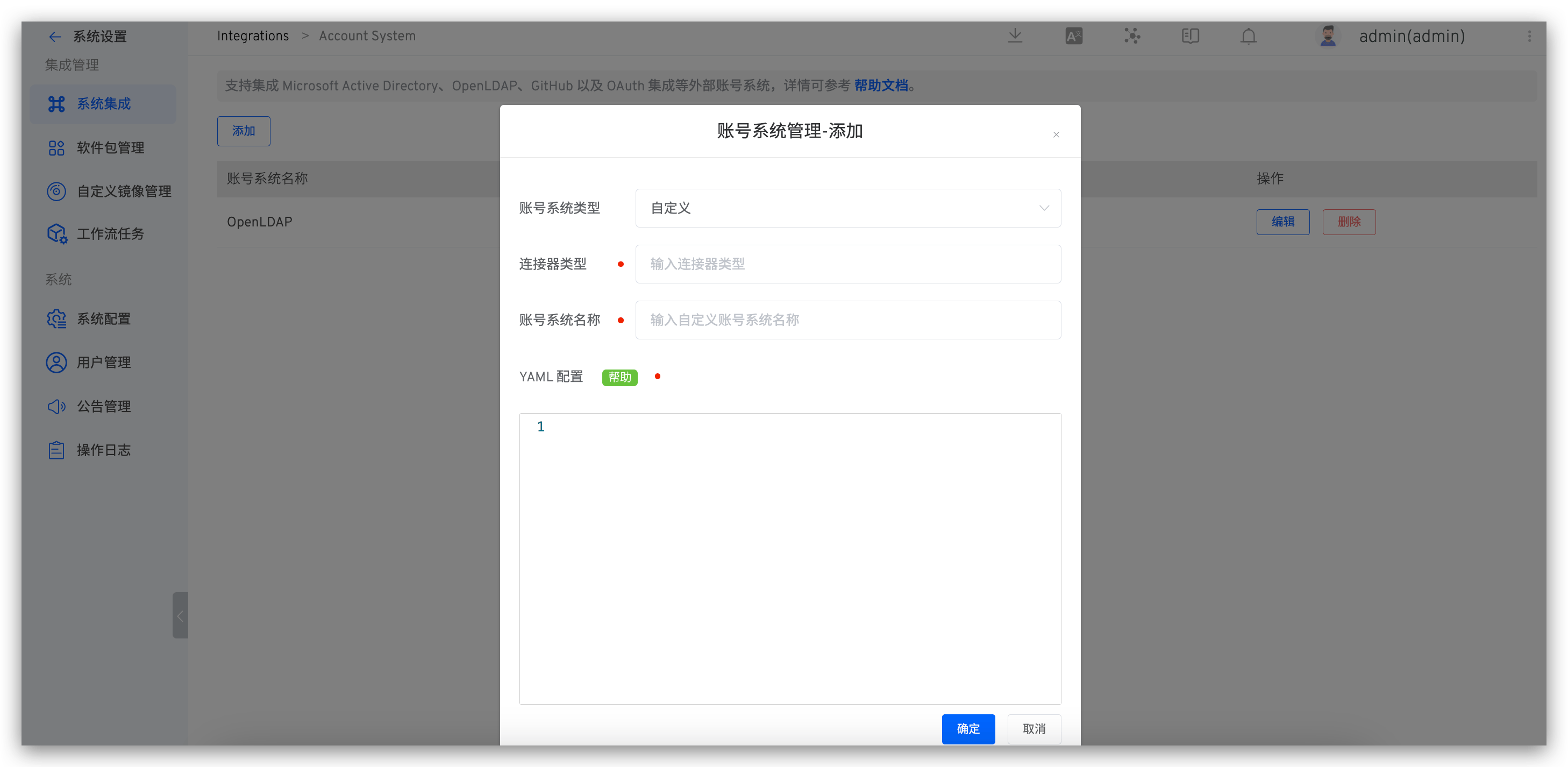
After logging in Zadig Platform, enter the account type at System Setting -> Account -> Custom YAML configuration, as shown in the figure below.
YAML Configuration is generated by the
Configstructure in Connector .
# Step 4: Log in With a Custom Account System Zadig
Visit the Zadig login page and click on a third party to log in as shown in the figure below. Jump to the corresponding login page, enter the username and password to log in to the Zadig system.